
Awesome Water
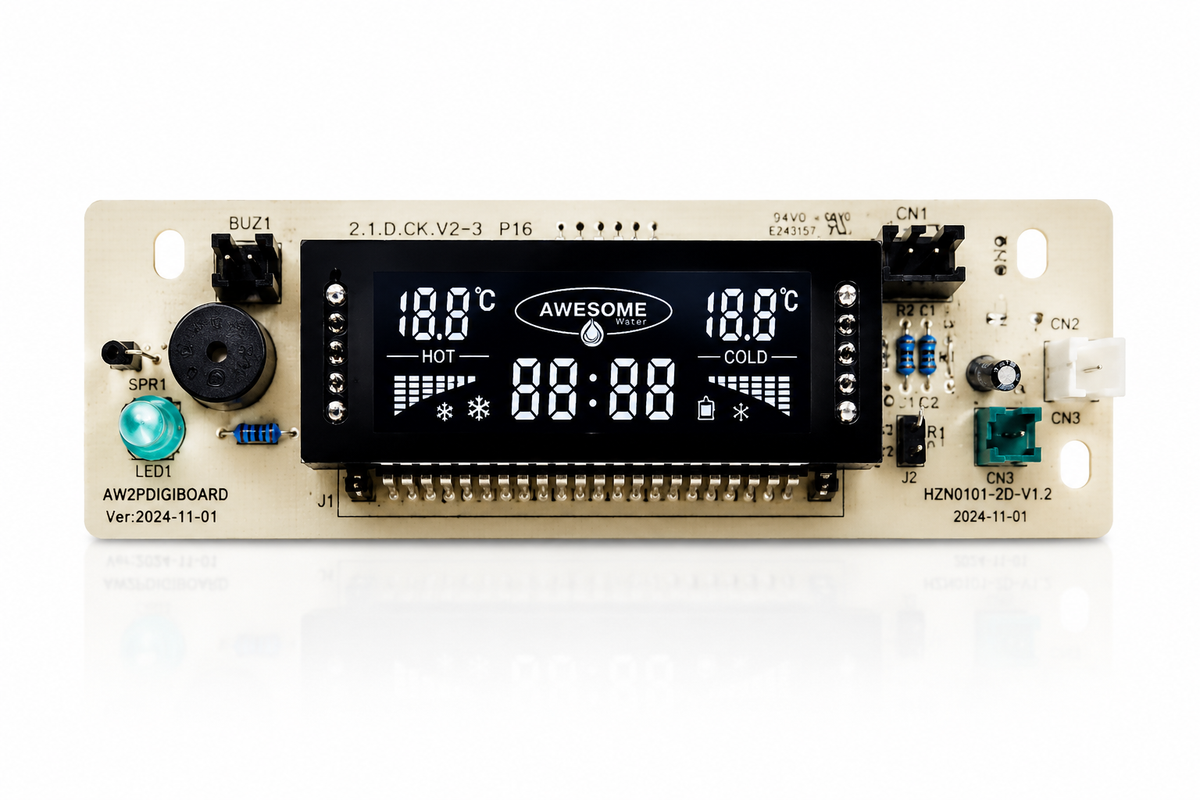
Awesome Water 2-Pin Digiboard – Water Cooler Spare Part
Awesome Water 2-Pin Digiboard – Water Cooler Spare Part
Flexible ways to pay
Couldn't load pickup availability
Awesome Water 2-Pin Digiboard – Water Cooler Spare Part
The Awesome Water 2-Pin Digiboard is a replacement electronic control component designed for compatible Awesome Water benchtop and older freestanding water coolers.
If your water cooler is no longer cooling correctly, the digiboard may be one of several components that requires inspection. Before ordering, we recommend working through the compatibility and troubleshooting information below to help determine whether this is the correct spare part for your cooler.
Important: This listing is specifically for the 2-pin digiboard. Please check your existing component and connections before ordering.
Water Cooler Not Cooling?
If your compatible water cooler has stopped cooling, there are three main components worth checking:
- Compressor switch
- Control board (motherboard)
- Digiboard
The information below can help you inspect your cooler before deciding which replacement part may be required.
First: Check the Age of Your Water Cooler
Look for the grey identification sticker on the back of your water cooler. On applicable models, the first two green numbers indicate the year associated with the unit.
If your water cooler dates from before 2006, compatible spare parts can be difficult to source. Depending on the condition and age of the unit, replacing the cooler may be a more practical long-term option.
Troubleshooting Checklist
1. Check Whether the Compressor Starts
Turn the water cooler off and leave it switched off for at least 3 minutes. Turn the machine back on and activate cooling using the blue snowflake button.
Allow approximately 2–3 minutes and listen for the compressor starting. You may hear a slight sound similar to a refrigerator switching on. On applicable models, the display should show a blue triangular grid with a small blue snowflake near the temperature display.
You may also be able to carefully place your hand against the right-hand side of the cooler and feel the compressor begin operating.
If the compressor does not appear to start, the compressor switch is one component that may require inspection or replacement.
2. Inspect the Compressor Switch
The compressor switch is located towards the rear of the water cooler, behind the grille. A torch can make the component easier to see when inspecting the area.
3. Inspect the Control Board (Motherboard)
Check the control board for visible signs of damage, overheating or burning.
To access the control area on compatible models:
- Switch the water cooler off and disconnect it from power.
- Remove the bottle and bottle set from the cooler.
- Remove the two screws located at the rear of the cooler.
- Carefully loosen and remove the lid, taking care not to pull or disconnect the wiring.
- Locate the metal control box and remove the two retaining screws at the rear where applicable.
- Inspect the board for obvious signs of burning or physical damage.
If the control board shows visible signs of damage or burning, it may require replacement.
4. Inspect the Digiboard
Inspect the digiboard located around the rear of the lid/control area for visible signs of burning, overheating or other physical damage.
If the digiboard is visibly damaged, a replacement digiboard may be required.
2-Pin Digiboard Compatibility
This replacement digiboard is designed for compatible:
- Awesome Water benchtop water coolers
- Older Awesome Water freestanding water coolers
- Models using the 2-pin configuration
- Applicable models with yellow and white plug connections
- Applicable older coolers with two switches at the rear of the machine
Please compare your existing digiboard, plug configuration and cooler model before ordering.
Not Sure Which Spare Part You Need?
Water cooler faults can have similar symptoms, so we recommend confirming compatibility before purchasing electrical spare parts.
If you are unsure whether you need the 2-pin digiboard, compressor switch or control board, contact Awesome Water with details of your cooler before ordering. Providing the model information and clear photos of the existing component and connections can help identify the correct replacement part.
Electrical safety: Always disconnect the water cooler from mains power before removing covers or inspecting internal components. If you are not confident working around electrical equipment, have the cooler inspected by a suitably qualified technician.
Need help confirming compatibility?
Contact the Awesome Water team before ordering and we can help you identify the most suitable spare part.
Share